How to bring AI agents into on-call without building a parallel process
Bring AI agents into on-call inside Jira and Teams: one ticket per cause, shadow mode first, scoped projects, and plain code that verifies every agent write.

The safest way to bring AI agents into on-call is to run them inside the process your team already uses. Agents should write to existing Jira projects, post in existing Teams channels, add evidence to tickets engineers already opened, and propose changes that plain code verifies before anything is written. Start in shadow mode, measure how often the agent agrees with your engineers, then widen scope through configuration.
Agents have moved from writing code to running it
Coding agents changed the inner loop fast. In BairesDev's Q3 2026 Dev Barometer, 42% of developers said AI writes at least half their code, up from 12% a year earlier. Now engineers are pointing agents at the outer loop too: triaging alerts, diagnosing failures, and coordinating the response in production.
More code shipped faster also means more to fix. The same survey found 52% of developers spend more time debugging problems AI introduced. Splunk and Oxford Economics put the cost of downtime for the Global 2000 at $600 billion a year in May 2026, up 50% in two years. As Kamal Hathi, SVP and GM of Splunk, put it: "Downtime is inevitable; prolonged disruption is not."
Engineering leaders ask a practical question. They already have ticketing, escalation, ownership, and review. How do they add agents without breaking any of it?
Production is harder to check than code
An agent's work in production is harder to verify than its work in a pull request, and its mistakes land on customers. In the inner loop, tests, code review, and staging catch bad output before users see it. In production there's no equivalent. You can't unit test a diagnosis.
The condition that caused the problem may be gone a minute later. The incident may resolve on its own. By the time a fix ships, the system has moved, so it's hard to say whether the fix is what resolved it. That leaves no clean signal on whether the agent was right.
The cost of being wrong is also higher. A wrong diagnosis extends the incident. A wrong fix can make it worse. False alarms cost on-call engineers sleep and trust. LLMs make this harder because they're good at spotting correlation and presenting it as causation, with a confident, plausible explanation that's easy to accept in the middle of an incident. We've written about how often on-call agents get this wrong and how to check a diagnosis before it touches production. Causely does that work continuously. It identifies which cause explains which symptoms before anyone declares an incident, so agents start from the cause instead of guessing from correlated signals.
Agents beside the process create a second system
An agent that runs beside your existing process creates a parallel system, and that causes havoc. Most enterprise teams already have Jira projects with clear owners, routing by team and service, Teams channels for live coordination, runbooks and postmortems in Confluence, and several monitoring tools generating alerts. That setup encodes years of tribal knowledge. In regulated orgs it's also what auditors check.
Drop an agent next to all that and you get:
- Two tickets for the same problem.
- An agent investigating something engineers already agreed how to fix.
- No clear owner for getting it resolved.
The bigger cost is trust. Skeptical engineers remember every time the agent was wrong, and there's no objective record of the times it was right to weigh against the anecdotes.
Here is an example: Causely MCP and Rovo MCP in Jira and Teams
We published an open-source reference workflow that connects the Causely MCP server and the Atlassian Rovo MCP Server to Jira and Microsoft Teams. It opens one Jira ticket per Causely Issue, keeps that ticket current with evidence, and posts each step to a Teams channel.
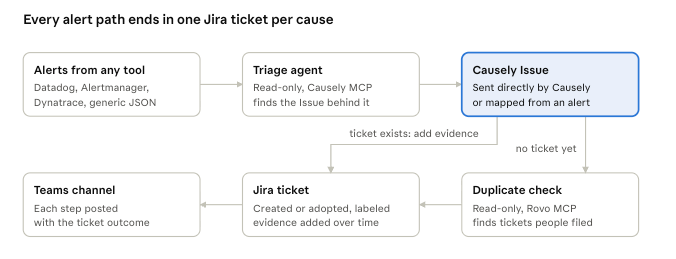
Adding agents to the outer loop is an operating model change, and it needs the same discipline as any process change made at scale with real consequences. The workflow is built on five principles that apply whatever tools you use:
| Principle | What it means | How the workflow applies it |
|---|---|---|
| Work in the existing process | Agents write to existing systems of record and post in the channels engineers already use. | Tickets go into existing Jira projects, routed by cluster, namespace, service, or team label. Each step posts to a defined Teams channel. Rovo Search attaches related runbooks and postmortems from Confluence. |
| Observe before acting | Agents run in shadow mode, and the team compares their diagnosis and proposed change with its own decisions. | JIRA_DRY_RUN=true runs the full analysis against live production, but writes each would-be ticket to a local file instead of Jira or Teams. Teams compare those files to what they filed. |
| Collaborate on work already done | If an engineer already opened a ticket, the agent adds evidence to it instead of opening a new one. | Before opening a ticket, a read-only Rovo agent searches the project for one a person already filed. On a high-confidence match it labels that ticket and adds evidence instead of creating a new one. |
| Govern scope in code | The projects, repos, channels, and systems an agent can touch are set by policy and enforced in code the agent can't change. | A default project is required. Allow and block lists are checked at startup, on every request, and again before every write. The service won't start if the policy is misconfigured. |
| Verify before writing | Agents propose; deterministic code checks a verifiable condition, or a human approves, before anything changes. | Both agents only get read-only MCP tools, with caps on turns and cost. They propose an Issue ID or a draft ticket. Plain code then re-fetches each ID and confirms the target ticket is open in a permitted project before writing anything. |
Only two steps use an LLM: alert triage and the duplicate check. Every Jira and Teams write happens in ordinary code, behind one lock per Issue.
One ticket per cause cuts through alert noise
The workflow also consolidates alerts. Consolidation only works if the cause is right. Alerts from Dynatrace, Datadog, Alertmanager, or any source that sends JSON get mapped to the Causely Issue that explains them, so one ticket can absorb every alert that cause produces. Engineers have learned to look at an alert and only act if it's new or sticks around. This flips that: one ticket for one cause, and every new alert with the same cause is added to that ticket as evidence. If no active Issue explains an alert, the bot posts to Teams and opens nothing. More on why alerts aren't the investigation.
The cost is low enough to run on every alert. At Claude Sonnet 5.5 pricing, triage runs $0.05 to $0.15 per alert, capped at $0.50 and 12 turns. The duplicate check is about $0.09 per new ticket, capped at $0.40 and 10 turns. Tickets triggered directly by a Causely Issue need no model calls if you turn the duplicate check off.
It has limits worth knowing. It runs as a single always-on instance, since the per-Issue lock and SQLite state live in the process. This and other limits are called out in the README.
Roll it out in three stages
The workflow is built for a staged rollout where scope grows with measured results:
- Shadow. Run in dry-run mode against live Causely Issues in production. Measure how often the proposed ticket matches what engineers filed, and review every disagreement. In some cases the agent found a cause the team missed.
- Pilot. Pick one Jira project and one alert source, and turn on Jira writes for those. Measure how many agent-opened tickets get resolved, and how.
- Expand. Add projects, teams, and alert sources through config as resolution rates hold.
Set the bar for each step before you start: a minimum agreement rate in shadow mode, a minimum duplicate-detection accuracy in the pilot. Auto-transitioning tickets and automated remediation are the natural next stages. They aren't part of this example; see what should trigger an autonomous agent in production for where that goes.
What you get from going this way is a record. Every agent decision and the evidence behind it lives in the system engineers already use, and that record is what lets you hand agents more autonomy later.
FAQ
How do you add an AI agent to on-call without disrupting existing processes?
Run it inside the tools your team already uses. The agent writes to existing Jira projects, posts in existing Teams channels, and adds evidence to tickets engineers already opened. Scope is set by allow and block lists enforced in code, and every write is verified by deterministic code before it happens. Start in dry-run mode so the team can compare the agent's output with its own.
What is shadow mode for an AI agent?
Shadow mode runs the agent's full analysis against live production data without letting it write anywhere that matters. In the Causely and Rovo workflow, each would-be Jira ticket is saved to a local file instead. Teams compare those files with the tickets engineers filed, track the agreement rate, and review the disagreements. Measured against a bar set in advance, those decide when the agent gets write access.
How do you stop an AI agent from creating duplicate Jira tickets?
Check before you create. In this workflow, a read-only agent uses the Rovo MCP Server to search the target project for an open ticket covering the same problem. On a high-confidence match, the workflow labels that ticket and adds evidence instead of opening a new one. On a medium-confidence match, it creates a ticket and flags the possible duplicate in Teams.
Should an AI agent write directly to Jira?
Not in this design. The agents only have read-only MCP tools and return proposals, such as a Causely Issue ID or a draft ticket. Plain code then re-fetches each ID and confirms the target ticket is open in a permitted project before writing. That keeps every write auditable and stops a wrong model output from landing in a project it shouldn't touch.
How much does it cost to run an AI triage agent on every alert?
In the open-source Causely and Rovo workflow, triage costs $0.05 to $0.15 per alert at Claude Sonnet 5.5 pricing, with a hard cap of $0.50 and 12 turns. The duplicate check costs about $0.09 per new ticket, capped at $0.40. Both caps are configurable, and the duplicate check can be turned off entirely.
What to do next
You'll need Python 3.11+, an Anthropic API key, and Causely API credentials. If you don't have a Causely account, sign up here.
Copy the setup prompt from the causely-oss/jira-teams-workflow README and paste it into Claude Code. It clones the repo and walks you through a local dry run against your own Causely Issues, then shows you the tickets it would have filed and what each one cost.